Cash App Scams: How They Work and How to Stay Safe
Most Cash App scams come down to one move: someone gets you to send money, or hand over a sign-in code, and then you never hear from them again. The fixes are simple. Only pay people you know and trust. Never share a code or PIN. Treat any rush, any “support agent” who contacts you first, and any promise of free money as a stop sign. If you already sent money, report it in the app right away.
This guide walks through the scams people actually run, the signs that give them away, and what to do in the first hour if something goes wrong.
TL;DR
- Cash App is built for sending money to people you know. Scammers use it because payments to strangers are hard to take back.
- The big ones: fake customer support, cash flipping, fake giveaways, “pay to receive” tricks, fake overpayments, and deposits for rentals or pets that do not exist.
- Real Cash App support will not ask for your sign-in code, PIN, full card number, Social Security number, a payment, or remote access to your phone.
- If you sent money to a scammer, report it to Cash App right away and ask for a reversal or refund, then file a report at ReportFraud.ftc.gov.
- Slow down. Urgency is the scammer’s best tool.
Table of Contents
- Why scammers like Cash App
- The most common Cash App scams
- Why a scammer wants your Cash App info
- Warning signs at a glance
- How to avoid Cash App scams: a simple routine
- What to do if you already sent money
- Are Cash App scams still going on?
- Our perspective
- Build a habit, not just a checklist
- FAQ
- Sources
Why scammers like Cash App
Peer-to-peer apps move money fast. That is the whole point of them, and it is also why they attract fraud. When you pay a friend, there is no store, no card network and no clerk in between. If the “friend” turns out to be a stranger, there is often nothing to pull the money back with.
The Federal Trade Commission’s advice is to use mobile payment apps only with people you know and trust, double-check recipient details, and protect your account with multi-factor authentication or a PIN. That is a good rule to keep in your head for everything below.
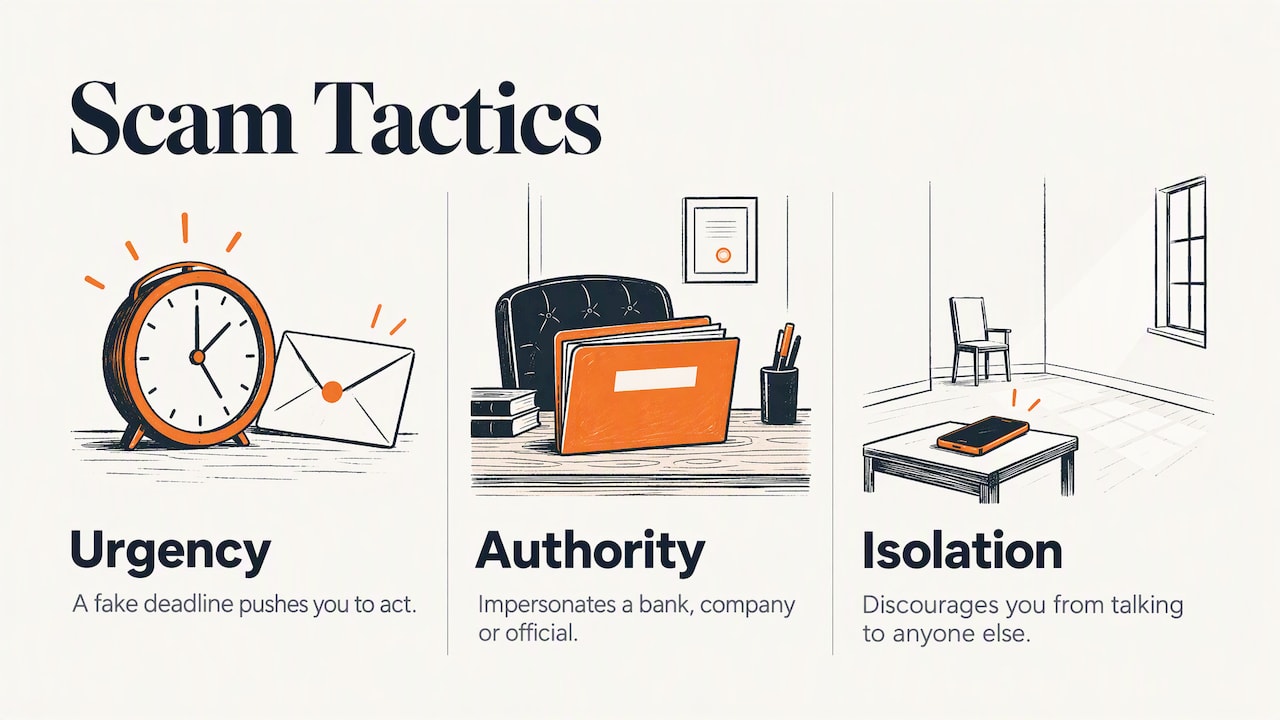
Cash App’s own 2026 scam guide points out that scams tend to lean on three things: urgency, authority and isolation. A fake deadline pushes you to act. Someone pretends to be a bank, a company or an official to borrow trust. Then they discourage you from talking to anyone else, so nobody can tell you it is a scam. Watch for that pattern. It shows up in nearly every case.
The most common Cash App scams
Cash App’s help center lists cash flipping, fake giveaways, payment-claiming requests, fake settlement notices, pet or rental deposits, accidental-payment requests and phishing among the scams it sees. Here is how each one plays out.
Fake Cash App support
This is the one most readers run into. You post a complaint on social media, or search for a Cash App phone number, and someone “helpful” replies or answers. They may text you, call you, or send you a link to a fake site or app.
The District of Columbia’s insurance and banking regulator warns that fake support messages and phone numbers can lead to phishing links or fake apps. The result can be handing over passcodes or giving someone remote access to your account.
Here is the rule that settles it. Cash App says its representatives will not ask for your sign-in code, full debit card number, PIN, bank account information or Social Security number. They also will not ask you for a payment, ask you to install remote-access software, or ask you to make a test transaction. If someone asks for any of those, you are not talking to Cash App.
Cash flipping
The pitch: send $50 and get $500 back. Often it is posted by a hacked account belonging to someone you know, which makes it feel safe. Cash App describes these as “clearance fee” or cash-flipping scams: the scammer promises to multiply your money after you send an upfront payment, then keeps the payment and delivers nothing.
No legitimate person turns $50 into $500 for strangers. If they could, they would not need you.
Fake giveaways and prizes
A social media account says you won a prize, a stimulus-style payment or a celebrity giveaway. To “verify” you, you must send a small amount first. New York’s consumer protection guidance on peer-to-peer fraud makes the point plainly: real giveaways and sweepstakes never ask you to send cash to verify your identity. Report accounts that do.
If you want to see how the same trick works with checks, read our guide to fake check and overpayment scams.
“Pay to receive” and fake payment screenshots
This one is common when you sell something online. The buyer says they sent your money, shows you a screenshot, and then claims there is a problem: you need to pay a fee, upgrade your account or send a deposit before the money “unlocks.”
There is no such fee. A real payment shows up in your own app. A screenshot proves nothing, because anyone can make one. Check your activity feed, not the picture.
Accidental payment and overpayment tricks
Can you get scammed if someone sends you money? Yes. A stranger may send you money and then ask you to send it back, saying it was a mistake. Later they dispute the original payment with their bank or card, and you are out the money you returned.
Cash App’s guidance is to use its refund function instead of creating a brand-new payment. Better still, if an unexpected payment arrives from someone you do not know, do not send anything anywhere. Contact Cash App support through the app and let them sort it out.
The overpayment version is the same game with a fake check or fake payment: a buyer “accidentally” pays too much and asks you to refund the difference. Our fake check scam guide explains why a check that looks cleared can still bounce days later.
Rental, pet and ticket deposits
A listing for an apartment, a puppy or concert tickets asks for a deposit through Cash App to “hold” it. You cannot visit. The owner is out of town, or traveling, or in the military. After you pay, the listing disappears.
Paying a stranger on a payment app is the red flag by itself, because cards and verified platforms offer more protection. For apartments, see how to spot a fake rental before you pay.
Fake settlement and refund notices
You get a message saying you are owed money from a class action settlement, a tax refund or a lost-funds claim. First you must pay a fee, or “verify” your account. Real money owed to you does not require you to pay first. We cover this pattern in refund and recovery scams.
Phishing texts, emails and fake sites
A text says your Cash App account is locked, or a payment failed, with a link to fix it. The link goes to a copy of the sign-in page. Type your email or phone and the code Cash App sends, and the scammer is in your account. Our guide on scam texts and what to do if you tapped the link covers this in detail.
Bank impersonation
Someone calls pretending to be your bank’s fraud department. They say your account is under attack and tell you to send your money to yourself, or to “a safe account,” through a payment app. The American Bankers Association notes that legitimate banks do not instruct customers to send money to reverse fraud. Caller ID can be faked, so a familiar number proves nothing. For a closer look at how spoofed calls fool people, this walkthrough on how to verify bail bond scams and spoofed calls shows the same impersonation tactics in another setting.
Why a scammer wants your Cash App info
It helps to know what the other side is after. The American Bankers Association says scammers may ask for passwords, card details, authentication codes or Social Security numbers to open payment accounts in your name, steal your identity or get into accounts you already have.
So yes, someone can steal personal information through a Cash App scam. It does not happen because the app is broken. It happens because a person talks you into giving it up. That is why the rules below are about your behavior, not about settings.
Warning signs at a glance
| What you see | What it usually means | What to do |
|---|---|---|
| “Send $X and get more back” | Cash flipping | Do not send. Report the account. |
| Someone contacts you first as “Cash App support” | Impersonation | Stop. Use only the app’s own support chat or phone number. |
| Asked for a code, PIN or Social Security number | Account takeover or identity theft attempt | End the conversation. |
| “Pay a fee to unlock your payment” | Pay-to-receive scam | Check your real balance. Pay nothing. |
| Money arrives from a stranger who wants it back | Reversal and dispute trick | Do not send it back. Contact support. |
| Deposit for a rental, pet or tickets, no way to see it in person | Fake listing | Walk away. |
| A friend asks for money out of the blue | Possibly a hacked account | Call them and confirm. |
That last row matters. The Consumer Financial Protection Bureau makes the point that familiarity does not prove a request is real: even a request that seems to come from someone you know should be confirmed independently. Call them. Do not reply in the same thread.
How to avoid Cash App scams: a simple routine
You do not need to be technical. Do these things and you block most of what is out there.
- Pay only people you know. Cash App’s guidance is to use it with people you trust and to not send money for promised future items or free money.
- Check the recipient before you hit send. The ABA recommends verifying the recipient’s name, email, phone number or other identifier every time. One wrong digit sends money to a stranger.
- Turn on a PIN and multi-factor protection. The FTC lists this as a basic step. If someone grabs your phone, it is one more wall.
- Turn on transaction alerts and keep the app updated. The ABA also suggests avoiding financial activity on public Wi-Fi.
- Never share codes. A sign-in code is the key to your account. No one legitimate needs it from you.
- Contact support only from inside the app. Do not search for a phone number and call the first result.
- Take ten minutes. If you feel rushed, that feeling is the red flag. Ask a family member, or run the situation through our free two-minute scam check.
If you are a parent
If a teen uses Cash App, sit down together and go through the list above. Talk about the three most likely traps for young people: fake giveaways on social media, “flip” posts from friends’ hacked accounts, and sales of game items or sneakers to strangers. Make a rule that no money goes out to someone they have not met in person without a check-in first. Our Family Safety Checkup covers the phone settings to review at the same time.
If you are helping an older parent
Older adults are often targeted with bank impersonation, fake support and “you owe money” calls. Agree on one thing in advance: any request for money or codes, even from a familiar voice, gets a call back on a number you already have. Our tech safety plan for older parents gives you a way to set that up without it feeling like a lecture.
What to do if you already sent money
Do not blame yourself. These scams are built by professionals. Speed matters more than shame. Work through these steps in order.
- Report the payment in Cash App. Cash App says you can report a scam from the activity feed: select the transaction and tap Report. You can also use in-app chat or call 1 (800) 969-1940, according to Cash App’s security page. It says prompt reporting helps with investigation and account protection.
- Ask for a reversal or refund. The FTC says to report the payment to Cash App immediately and ask for it to be reversed or refunded. Success is not guaranteed, but asking quickly gives you the best chance.
- Contact your bank or card issuer. If you funded the payment from a linked bank account or card, the CFPB advises contacting the bank or payment company right away about a suspected unauthorized transfer.
- Secure your account. If you shared a code, PIN or password, change it now. Remove any remote-access app the caller had you install. The FTC’s what to do if you were scammed page walks through securing compromised accounts.
- File a report. Report it to ReportFraud.ftc.gov. Cash App’s scam guide also points to the FBI’s IC3 for internet crime. Reports help investigators spot patterns, even when your own money cannot be recovered.
- Watch for the second scam. People who have been scammed often get a follow-up call from someone offering to “recover” the money for a fee. That is another scam. Our refund and recovery scam guide explains why.
If you shared your Social Security number, consider a credit freeze. If you are not sure what to do next, our Get Help Now page lays out the steps after a scam or hack.
On the question of getting your money back: Cash App says it monitors for threats, can flag potential scams before a payment completes, and may reimburse eligible unauthorized-transfer claims under its dispute-resolution requirements. Note the word unauthorized. When you send money yourself because you were tricked, the situation is harder, which is why prevention matters most.
Are Cash App scams still going on?
Yes. Cash App published an updated scam guide in August 2026, and the patterns it describes are the ones in this article: impersonation, fake prizes, money flips, rental and deposit tricks, and accidental payments. The names and the stories change. The ask stays the same: money or codes, fast, from someone you did not expect.
Our perspective
We read a lot of scam reports, and the pattern is steady. People rarely lose money because they are careless or “bad with tech.” They lose it because someone caught them in a busy moment with a believable story, and the app made it easy to say yes.
So we do not tell families to memorize every scam. There are too many, and they change monthly. We tell them to memorize two questions. Did I start this contact, or did they? And are they asking for money, a code or a hurry? If the answer to the second is yes, stop, and check with a person you trust before you tap anything.
We also think families should talk about scams before one happens. A parent who has said “you can always tell me, I will not be mad” gets a phone call within minutes instead of a secret kept for a week. Minutes are when a reversal request still has a chance.
— Robert
Build a habit, not just a checklist
If this guide helped, take the next step with the whole household. Our Family Safety: Start Here page gives you a simple order to work through, and our free printable scam and safety guides are easy to stick on the fridge or hand to a grandparent.

For more warning signs across every kind of fraud, browse Scam A to Z or the Scams & Fraud hub. You may also find our guides on crypto investment scams and package delivery text scams useful, since both often lead victims toward payment apps.
FAQ
Can I get scammed if someone sends me money on Cash App?
Yes. A scammer may send you money, claim it was a mistake, and ask you to send it back. Later they dispute the original payment, and you lose what you returned. Do not send money back as a new payment. Use Cash App’s refund function or contact support in the app.
Can someone steal my info from Cash App?
Yes, usually by tricking you into giving it away. Someone posing as Cash App support may ask for a sign-in code, PIN, card details or remote access to your phone. Cash App says its real representatives will not ask for those. Keep your PIN on, never share codes and use only the in-app support options.
Why would a scammer ask for my Cash App?
They want to get paid, or get in. Some ask for your $Cashtag so you will send money in a flip or fake giveaway. Others ask for codes and personal details to take over your account or open new ones in your name. Treat any unexpected request as a red flag.
Where do I report a Cash App scam?
Start in the app: open the transaction in your activity feed and tap Report. Then file a report at ReportFraud.ftc.gov. If the scam involved a linked bank or card, call that company too. Report quickly, because time is the main factor in whether a payment can be stopped.
Is it safe to use Cash App at all?
It is safe enough for paying people you know, if you use a PIN, turn on alerts and never share codes. The risk comes from paying strangers and from contacts that start with someone else’s urgent story. Keep the app for friends and family, and use a card for strangers.
Sources
- Avoiding Common Scams with Cash App
- How to Avoid Cash App Scams
- Common Scams Guide: Spot, Avoid & Report, Cash App
- Cash App Security: Protecting Your Money & Account
- Mobile Payment Apps: How To Avoid a Scam When You Use One, FTC
- What To Do if You Were Scammed, FTC
- What are some common types of fraud and scams? CFPB
- Peer to Peer Payment Scams, American Bankers Association
- Scammers Posing as Cash App Customer Service Representatives, DISB