Account Takeover Prevention: How to Lock Down Your Accounts
Account takeover happens when a criminal logs in as you, to your email, bank, social media or shopping account, and uses it to steal money or information. You can make it much harder with a few habits: a unique password for every account, a password manager, two-factor authentication (an authenticator app or security key is best), and never signing in through a link someone sent you. This guide walks through each step in order, then covers the warning signs and what to do in the first hour if it happens anyway.
TL;DR
- Account takeover is a criminal using your login to act as you. The usual routes are phishing, reused passwords from data breaches, fake support calls and malware.
- Use a password manager, a different password on every account, and two-factor authentication on every account that offers it. Choose an authenticator app or security key over text codes when you can.
- Never sign in from a link in an email, text or ad. Use a bookmark or the company’s app.
- Start with your email and phone accounts, because they can reset almost everything else.
- If you spot trouble, contact the company, change your passwords, freeze your credit and report it at ic3.gov.
Table of Contents
- What account takeover is
- How criminals get into your accounts
- Which accounts to protect first
- Account takeover prevention: 10 steps that work
- Warning signs that your account has been taken over
- What to do in the first hour
- Our perspective
- Get the whole family covered
- Different people, different risks
- FAQ
- Sources
What account takeover is
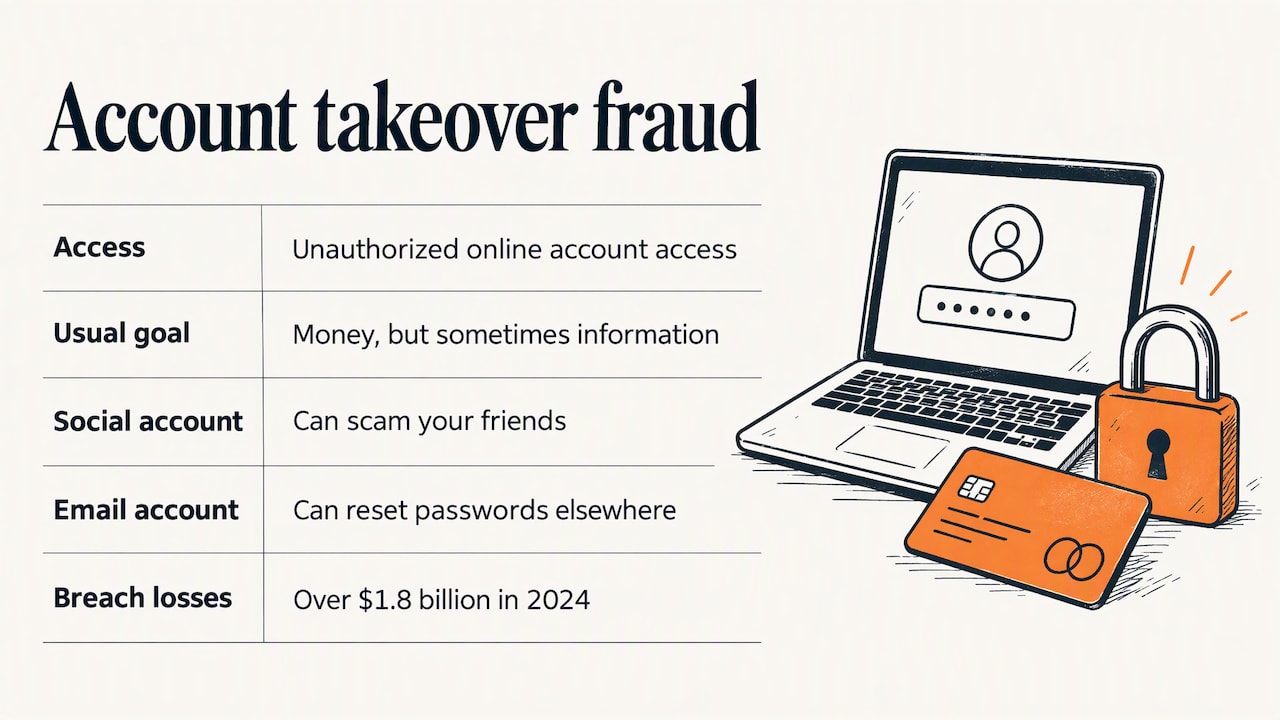
The FBI’s Internet Crime Complaint Center (IC3) describes account takeover fraud as criminals deliberately gaining unauthorized access to a victim’s online bank, payroll, health savings or social media account to steal money or information. The goal is usually money, but not always. A hijacked social media account can be used to scam your friends. A hijacked email account can be used to reset passwords everywhere else.
This is different from someone simply guessing a single password once. Takeover means the criminal now controls the account, often changes the password and recovery details, and locks you out. If you want to understand how this sits next to other threats, our explainer on phishing, malware and ransomware breaks down the terms.
The scale is large. New York’s Department of State reports that data breaches led to over $1.8 billion in losses in 2024. Those stolen logins are the raw material for takeover attempts.
How criminals get into your accounts
Knowing the routes tells you which habits matter. IC3 lists brute forcing, phishing emails or websites, social engineering, data breaches and malware as the main methods. Here is what each looks like in daily life.
Fake sign-in pages and fake ads
You get an email or text that says your account is locked, or a payment failed. The link goes to a page that looks right. You type your password, and the criminal now has it.
There is a version that does not need a message at all. The FBI has warned about criminals buying search ads that imitate real financial institutions and sending people to convincing phishing sites. The tactic is called SEO poisoning. You search for your bank, click the top result, and land on a copy. Our guide to fake government and bill-pay sites shows how to find the real one.
Passwords leaked in data breaches
When a company is breached, the stolen email and password pairs get traded and tried on other sites. The U.S. Payments Forum notes that the data-gathering stage is a low-barrier process that often relies on automated tools to go after many accounts at once using breached data. If you reuse a password, one old breach can open a new account. That is the single biggest reason to use a different password everywhere.
Phone calls and texts from “support”
A caller says they are from your bank or a tech company. They ask for a code that was just sent to you. That code is the key to your account. IC3 advises being suspicious of unknown bank or company employees who call and ask for usernames, passwords or one-time passcodes. A real employee will not need your code. For more on this pattern, see our page on IRS and Social Security imposter scams.
Malware on your device
A bad download, a fake app or an infected attachment can record what you type or steal saved logins. Updates and cautious downloading close most of these doors.
Someone you know
The U.S. Payments Forum also points out that takeover can occasionally be done by people close to the account holder, such as relatives or employees, acting without permission. A lock on your phone and accounts that are not shared by default help here.
Which accounts to protect first
Not all accounts carry the same risk. Protect them in this order.
- Your main email account. Most “forgot password” links go here. If a criminal controls it, they can reset everything else.
- Your phone account (carrier). Loss of mobile service can be a sign someone has taken over your number, and text codes depend on it. FINRA lists loss of mobile phone service among the warning signs.
- Banking, credit card, payroll and health savings accounts. These hold money directly.
- Your password manager and Apple, Google or Microsoft account. These unlock many other things.
- Social media. Criminals use hacked profiles to scam your contacts. See our guide to recovering a hacked social media account.
- Shopping, delivery and subscription accounts. These often have saved cards and addresses.
If you do only step one and two today, you have removed the most useful targets.
Account takeover prevention: 10 steps that work
The FTC’s advice on protecting your information boils down to strong passwords, a password manager, two-factor authentication, updated software and caution with unexpected links. Here is how to put that into practice.
- Get a password manager. It creates and remembers long, random passwords so you do not have to. Pick one, set a strong main password, and write that main password down and keep it somewhere safe at home.
- Give every account its own password. Start with email and banking, then work down the list. Replace any password you have used in more than one place.
- Turn on two-factor authentication. The FTC recommends an authenticator app or a security key when possible. Text codes are better than nothing, but an app is the stronger choice.
- Never share a code. A one-time code is for you only. No bank, store or government agency needs you to read it out.
- Use bookmarks to sign in. IC3 recommends using bookmarks or favorites rather than search results or advertisements to reach login pages. Bookmark your bank, email and key accounts once.
- Do not trust links in unexpected messages. The FTC says to contact the company using a phone number or website you know is real. Use the number on the back of your card.
- Keep software updated. Turn on automatic updates for your phone, computer, browser and apps.
- Update your recovery details. Check that the backup email and phone number on your key accounts are yours and current.
- Turn on account alerts. Sign-in alerts and transaction alerts tell you quickly when something changes.
- Check your accounts regularly. IC3 advises regularly monitoring your financial accounts for irregularities. A quick look once a week is enough.
Add one more if you are ready: a free credit freeze. The FTC explains that while a freeze is in place, nobody can open a new credit account in your name. A freeze does not stop someone logging into an existing account, but it blocks the next step in many identity theft cases.
Not sure whether a message is real? Run it through our free two-minute scam check before you click.
Warning signs that your account has been taken over
Catch it early and the damage is smaller. FINRA lists these signs:
- Unauthorized transactions or missing funds
- Changes to account information you did not make, such as an address or phone number
- Loss of mobile phone service
- Unusual account notifications
- Missing account statements
- Unfamiliar creditors on your credit report
On email and social media, look for password reset messages you did not request, sign-in alerts from places you have never been, sent messages you did not write, and friends telling you they got a strange message from you.
If your bank spots a possible takeover, it may freeze the account to protect you from further losses. That can be annoying, but it is a good sign that someone is watching.
What to do in the first hour
Do these in order. Speed matters more than perfection.
- Call your bank or card issuer. Use the number on your card or statement, not one from a message. IC3 advises asking right away for a recall or reversal of any fraudulent transfer.
- Change the password on the affected account if you can still sign in. Then change it on your email, since that is the master key. Use a new, unique password.
- Reset every credential that may have been exposed. IC3 says to reset all credentials that may have been exposed. If you reused the password anywhere, change those too.
- Turn on two-factor authentication on every account that allows it.
- Run updates and a security scan on your phone and computer in case malware captured your login.
- Freeze your credit with each of the three credit bureaus. It is free.
- Report it. IC3 asks you to file a detailed complaint at ic3.gov, include your banking information, and use the words “account takeover” in the description. If a fake ad or search result sent you to a fake site, mention “SEO poisoning” too.
- Warn your contacts if a social or email account was used to message them.
If your personal information was used to open new accounts or file taxes, move on to our identity theft recovery steps. If the trigger was a company breach, our five-step data breach checklist shows what to do next. For money lost, see financial fraud: types, warning signs and what to do.
Our perspective
We read a lot of scam reports, and one pattern shows up again and again: people are told to “be more careful,” when the real fix is to make carelessness harmless. Nobody can spot every fake page on a tired Tuesday evening. A password manager that refuses to fill a login on the wrong site, a bookmark you trust, and an authenticator app do the careful part for you.
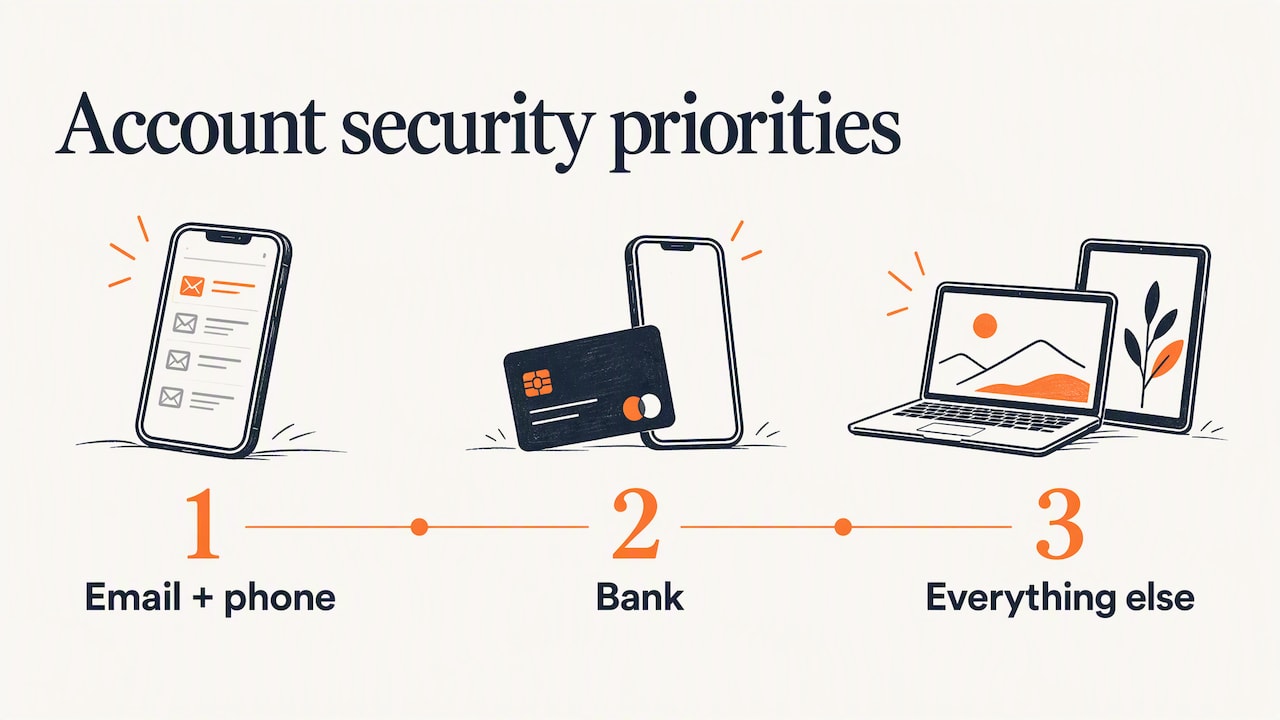
We also think the advice should match the person. A parent, a teenager and a grandparent get hit in different ways, so one list does not fit all. That is why we write in plain language, tell you what to do first, and skip the jargon. Start small. Email and phone first, then bank, then everything else. A calm, steady upgrade over a weekend beats a panicked one after something goes wrong.
— Robert
Get the whole family covered
Account security is easier when everyone in the house does it together. Our free Family Safety Checkup walks you through 20 steps covering passwords, two-factor authentication, privacy settings and scam habits, so you can finish the job in one sitting.
If you want something to hang on the fridge, our printable scam and safety guides are free too.
Different people, different risks
If you are a parent
Set up your child’s accounts with your email as the recovery contact, and use a separate unique password for each. Tell your kids never to share codes, even with a friend. Our Family Safety: Start Here page is a good starting point.
If you are a teen
Game, social and streaming accounts get hijacked often, and a “friend” asking for a code or a login is a common trick. Turn on two-factor authentication, and never click a link from a DM to “vote” or “claim” anything.
If you help an older parent
Sit with them and set things up together: password manager, bookmarks for the bank, and a family rule that nobody gives out a code over the phone, whatever the caller says. Our tech safety plan for older parents gives you a way to have that conversation. The FTC-based video on spotting scam warning signs is also a good watch together.
FAQ
What is the most effective way to prevent account takeover?
Use a unique password on every account and turn on two-factor authentication, ideally with an authenticator app or security key. Those two steps stop most attacks that rely on stolen or reused passwords. Add the habit of signing in through bookmarks rather than links or ads.
Is a text message code good enough for two-factor authentication?
It is much better than a password alone. The FTC recommends an authenticator app or security key when possible, because those are harder to intercept or trick out of you. If text codes are the only option, use them, and never read the code to anyone.
Does a credit freeze stop account takeover?
No, not by itself. A freeze stops someone opening new credit in your name, but it does not lock your existing accounts. Pair it with strong passwords and two-factor authentication.
Where do I report an account takeover?
File a complaint with the FBI’s IC3 at ic3.gov and give as much detail as you can, including banking information. Also tell the bank or company involved right away, since quick action can help recover money.
Can someone take over my account without my doing anything?
Yes, if your password was exposed in a data breach and you used it elsewhere, attackers can try it automatically without tricking you at all. That is why unique passwords and two-factor authentication matter even for accounts you think are unimportant.
Sources
- Account Takeover Fraud, Internet Crime Complaint Center (IC3)
- Account Takeover Fraud via Impersonation of Financial Institution Support, FBI
- Account Takeover: A U.S. Payments Forum Resource Brief
- Protect Your Personal Information From Hackers and Scammers, FTC
- Customer Account Takeovers: What They Are and How to Protect Yourself, FINRA
- When Information Is Lost or Exposed, IdentityTheft.gov
- New York Department of State, Division of Consumer Protection on account takeover